Little Word: A Minimalist Font for Clarity and Creativity
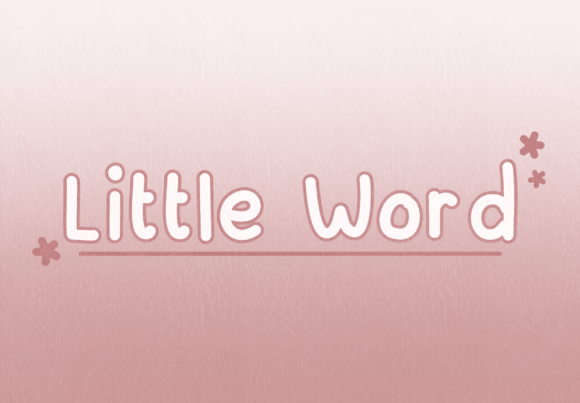
Little Word is a minimalist font that stands out for its clean, small, and cute design. It's tailored for users who need to present information clearly without overwhelming the reader. Whether you're working on digital note-taking, planners, banners, or presentations, Little Word offers a subtle yet effective way to convey your message.
This font is especially useful when dealing with large topics or small content. Its compact size allows for more text to be included in limited spaces, making it ideal for projects where space is a concern. At the same time, its cute aesthetic adds a friendly touch that can make even the most technical content feel approachable.
What Makes Little Word Unique?
Little Word distinguishes itself through its balance of simplicity and charm. Unlike many other fonts that either prioritize readability at the expense of style or vice versa, Little Word manages to do both. The font’s characters are designed with minimal strokes, which makes them easy to read even at smaller sizes. This feature is particularly beneficial for digital content where screen resolution can vary widely.
The cuteness of Little Word comes from its slightly rounded edges and the gentle curves in certain letters. These design choices give the font a soft, approachable look that can enhance the visual appeal of any project. However, this doesn’t come at the cost of functionality; the font remains highly legible across different mediums and sizes.
Comparing Little Word with Similar Fonts
When comparing Little Word with other similar fonts, it’s important to consider the specific needs of your project. Fonts like Arial, Helvetica, and Calibri are known for their high readability and professional appearance. They are often used in formal documents and business communications. While these fonts are excellent for clarity, they may lack the personality that Little Word brings to the table.
On the other hand, fonts such as Quicksand and Lato offer a modern, sans-serif look that is both stylish and readable. These fonts are great for web design and user interfaces but may not provide the same level of cuteness that Little Word does. If your goal is to create something that feels more personal or whimsical, Little Word could be a better fit.
For those looking for a more decorative option, there are fonts like Dancing Script and Pacifico that offer a much more playful and artistic feel. However, these fonts can be difficult to read in long passages or at smaller sizes. In contrast, Little Word maintains its legibility while still adding a touch of charm.
Best-Fit Situations for Little Word
Little Word is particularly well-suited for projects that require a balance between readability and style. Here are some situations where Little Word might be an excellent choice:
- Digital Note-Taking: With its compact size, Little Word allows for more text to be included in a single note, making it ideal for students or professionals who take a lot of notes digitally.
- Planners and Calendars: The cute design of Little Word can make a planner or calendar feel more inviting and personalized, encouraging regular use.
- Banners and Posters: When creating promotional materials, Little Word can add a friendly and approachable tone that can help attract attention.
- Presentations: Using Little Word in presentations can help keep the text clear and easy to read while also adding a touch of personality to the slides.
However, it's worth noting that Little Word may not be the best choice for all situations. For example, if you're designing a formal document or a technical manual, a more traditional font like Times New Roman or Georgia would be more appropriate. These fonts are designed for maximum readability and are less likely to distract from the content itself.
Strengths and Tradeoffs
One of the main strengths of Little Word is its ability to combine readability with style. This makes it a versatile font that can be used in a variety of contexts. Additionally, its compact size makes it ideal for projects where space is a constraint, such as mobile apps or social media posts.
However, there are also some tradeoffs to consider. Because of its cute and stylized design, Little Word may not be suitable for all types of content. In particular, it may not be the best choice for long-form text or highly technical documents where clarity is paramount. Additionally, while Little Word looks great on screens, it may not always render as well in print, depending on the printer and paper quality.
When to Choose Little Word and When to Look Elsewhere
If your primary goal is to create something that feels personal and approachable, Little Word is an excellent choice. It works particularly well for projects that aim to engage the reader on an emotional level, such as marketing materials, greeting cards, or children's books.
On the other hand, if you're working on a project that requires a high level of formality or technical accuracy, you may want to consider a different font. In these cases, a more traditional font like Arial or Times New Roman would be more appropriate. These fonts are designed to be neutral and unobtrusive, allowing the content itself to take center stage.
Ultimately, the decision to use Little Word should be based on the specific needs of your project. By considering factors such as readability, style, and context, you can choose a font that best meets your goals and helps you create content that resonates with your audience.
Practical Examples and Comparisons
To illustrate how Little Word compares to other fonts, let's consider a few practical examples:
Example 1: Digital Note-Taking
Imagine you're taking notes during a lecture. If you use a font like Arial, your notes will be very clear and easy to read, but they may feel a bit impersonal. In contrast, using Little Word would allow you to include more text in the same space while also giving your notes a more personal and engaging look.
Example 2: Planner Design
When designing a planner, the goal is to make it both functional and visually appealing. Using Little Word can help achieve this by adding a friendly and approachable tone to the planner. This can encourage users to interact with the planner more frequently and feel more connected to their daily tasks.
Example 3: Presentation Slides
In a presentation, the font you choose can greatly affect how your message is received. Using Little Word can help keep the text clear and easy to read while also adding a touch of personality to the slides. This can make your presentation feel more engaging and memorable to your audience.
These examples show that Little Word can be a valuable tool in a wide range of applications. However, it's important to remember that no single font is perfect for every situation. Choosing the right font depends on the specific needs of your project and the message you want to convey.
By carefully considering the strengths and limitations of Little Word, you can make an informed decision about whether it's the right choice for your next project. Whether you're looking for a font that combines readability with style or one that prioritizes formality and clarity, there's a font out there that can help you achieve your goals.